


Article PXFont Size. English.
Menu:
English is not my native language. Sorry for any errors. From here you can quickly navigate to the section that interests you most.
 Sitio en Español
- 1.- News. Latest news.
- 2.- Description. What is Article PXFont Size?
- 3.- History. Versions. Changes.
- 4.- Plugin download.
- 5.- Preview.
- 6.- FAQ (Frequently Asked Questions.)
1.- News. Latest news.


News (September 12, 2012): You can download the latest version 2.2.1 only for Joomla! 2.5.x.(,)
- Only new version for Joomla! 2.5.x
- Joomla! 2.5.x ? Article PXFont Size v2.2.1
- Joomla! 1.5.x ? Article PXFont Size v1.1.2
- Added visual disabilities icon
- Added two news buttons (17px): red and blue buttons. (Suggested by users).
- Added grey button (18px) (thanks and design by R. Rajoz)
- Fixed translation (thanks R. Rajoz)
- Fixed span title tag
- Added Option show/hide reset button
- Removed French and Portuguese back-end languages.
- Fixed: the plugin is not shown in Custom HTML Modules.
- You can edit your own CSS Style from Plugin Manager. (labels for image path)
- Optimized CSS and PHP code.
- Added debug mode (very important to fix errors)
- Fixed { h i d e f a } text error in featured view.
- Added font format options: smaller size, larger size, increment/decrement and format (px, em, cm, mm, % etc...) (Suggested by users)
- Fixed CSS bug, reported by Josep.
IMPORTANT!:
- To adjust the vertical alignment of text, change the line-height style that appears in the plugin options.
- Joomla 1.5 is supported until September 2012. Article PXFont Size v1.1.2 for Joomla! 1.5 will no longer be developed.
To install this version you just have to do it from Joomla, Extensions Menu -> Extensions Manager.
2.- Description. What is Article PXFont Size?
Article PX Font Size is a plugin for Joomla 1.5, 2.5. This plugin displays 2, 3 or 4 buttons on (Articles, Categories, Category, Section, Frontpage, Featured) views. You can increase or decrease the font size using these buttons. It is very easy to install and setup. It allows to only change the font a an article without touching the rest of the template.
IMPORTANT: The 1.1.2 plugin version not have all of the following features. The plugin features are as follows:
- Plugin for Joomla! v1.5.x, and v2.5.x
- Joomla! 2.5.x ? Article PXFont Size v2.2.1
- Joomla! 1.5.x ? Article PXFont Size v1.1.2
- Name: Article PXFont Size (Article Pixel Font Size - JavaScript for Joomla! v1.5, 2.5)
- File name: plg_content_articlepxfontsize_j15_112.zip, plg_content_articlepxfontsize_j16_221.zip
- Plugin version: 1.1.2 (February 01, 2012) - 2.2.1 (August 27, 2012)
- Plugin tested in: IE v5.5 - v9, Firefox, Opera, Safari, Netscape, Google Crome, tested also on mobile devices.
- You can enable or disable the plugin.
- You can Exclude articles
- You can add a inline style (css) to title.
- Two backend language files: English and Spanish.
- This plugin displays 2, 3 or 4 buttons on (Articles, Categories, Category, Section, Frontpage, Featured) views.
- You can change the plugin title. To not display the title, type: HIDE
- You can select the initial font size.
- You can select your font-size format: initial, maximum, minimum, increment/decrement and format(ex, em, px, cm, mm, pc, in, pt, %)
- There are 8 different buttons.
- If you do not want to display the plugin in an article, type in the same article the following. Enter it without spaces: { h i d e f a } or exclude an article.
- The plugin is now compatible with most templates
- You can select/write the tags to modify (div, p, table ...).
- Multilanguage Front-end. You can add your own tooltips (Español, Langue française, Calatá, Galego, Euskera, Português, ???????, etc...)
- Button for visual impairment: increase font size.
- You can edit your own CSS style.
- Debug Mode.
- Autor/e-mail: Esta dirección de correo electrónico está siendo protegida contra los robots de spam. Necesita tener JavaScript habilitado para poder verlo.
- Website: http://www.karmany.net
- Copyright (C) 2012 - karmany
- License GNU/GPLv3 http://www.gnu.org/licenses/gpl-3.0.html
- W3C validation
License: GNU/GPLv3: http://www.gnu.org/licenses/gpl-3.0.html
This plugin has been approved by official website of Joomla! extensions. Article PXFont Size was sent December 31, 2010 and was approved on January 23, 2011. Link: Article PXFont Size in extensions.joomla.org
3.- History. Versions. Changes.
Article PXFont Size v2.2.1 for Joomla! 2.5.x:
History.txt file is in the installer package.
- version 2.2.1 - Update only for Joomla 2.5.x (August 27, 2012)
- Only new version for Joomla! 2.5
- Added visual disabilities icon
- Added two news buttons (17px): red and blue buttons. (Suggested by users).
- Added grey button (18px) (thanks and design by R. Rajoz)
- Fixed translation (thanks R. Rajoz)
- Fixed span title tag
- Added Option show/hide reset button
- Removed French and Portuguese back-end languages.
- Fixed: the plugin is not shown in Custom HTML Modules.
- You can edit your own CSS Style from Plugin Manager. (labels for image path)
- Optimized CSS and PHP code.
- Added debug mode (very important to fix errors)
- Fixed { hidefa } text error in featured view.
- Added font format options: smaller size, larger size, increment/decrement and format (px, em, cm, mm, % etc...) (Suggested by users)
- Fixed CSS bug, reported by Josep.
4.- Download
This link will open in a new tab / window. NO need to register.
Joomla! v1.5.x - Article PXFont Size v1.1.2:
Joomla! v2.5.x - Article PXFont Size v2.2.1:
5.- Preview
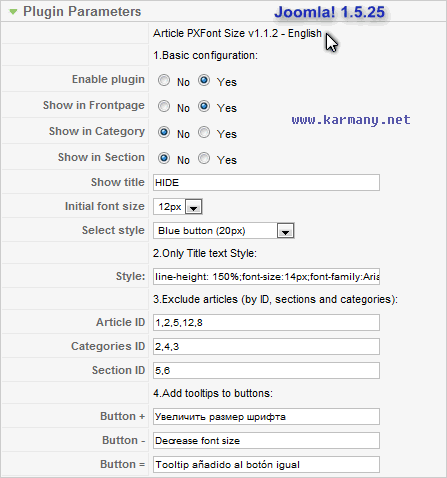
Joomla! 1.5 - Article PXFont Size v1.1.2
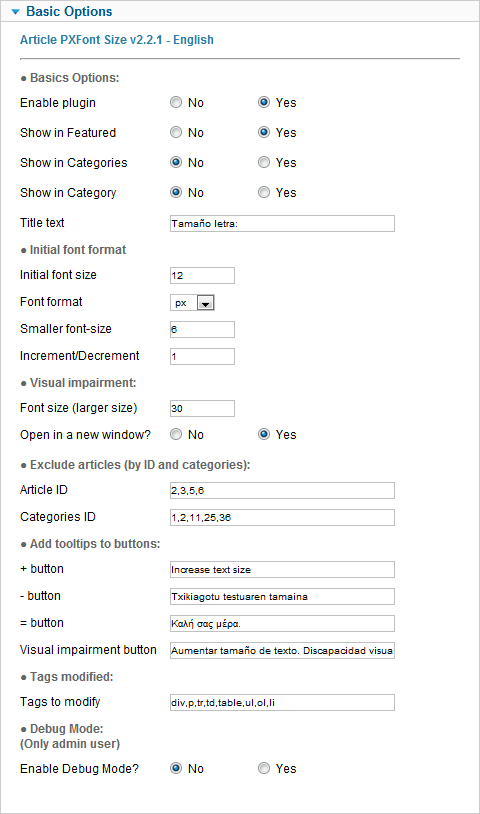
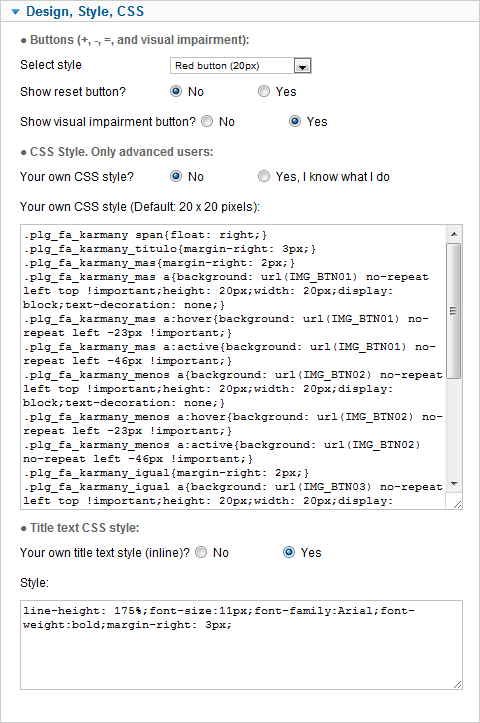
Joomla! 2.5 - Article PXFont Size v2.2.1
6.- FAQ (Frequently Asked Questions)
I installed the plugin but does not show anything. If this is the first time, you must activate it. Enable the plugin from the manager plugins: (Extensions->plugins->Article PXFont Size).
When I press the + button, the letter gets smaller. This occurs because you have not configured the plugin correctly. The plugin (Extensions->plugins->Article PXFont Size), lets you select the "initial font size." Surely you've set this value incorrectly.
Align text vertically. Once you update the plugin, we recommend that you delete the text box "Style" and save the configuration with empty text. In this way, you'll see the default code we have created and tested for this new version. This is useful to align text vertically: line-height in plugin style.
The buttons do not appear when using paging. This failure is very common and many people question. This occurs because you must give priority to content-pagebreak plugin. This plugin should run before Article PXFont Size. These settings must be done from the manager plugins.
In the plugin configuration, I changed the button style, but the button is not modified. This problem is usually due to the cache. You must clear the Joomla! cache stored.
Any questions you may have with the plugin, feel free to comment on it.


What do you want to say: "positioning the plugin..."
This next month I'll be very busy but I'm working on the new plugin for Joomla 3.
I hope to finish it before summer but I don't know because now I'm very busy...
Thks for your comment!
-How to get different buttons and colors, you say there are 8?
-Also, how can I put plugin in sidebar-b module?
Thanks for your great work!
I use Joomla 1.5
I installed the plugin and enable it but does not show anything.
Pls, can you help me?
Thanks
Joomla! 1.5 does not have Support yet!! Download The latest version of Joomla: 3.x
I have a problem where your plugin seems to interfere with images in the article of my website.
The image is meant to float left and have the text wrap around it however your plugin breaks the wrap around and the text drops down below the image. Do you have any idea how to resolve this?
page with pxfont: http://chatswoodgroveeye.com.au/index.php/en/the-doctors/dr-allan-bank
Try this:
1.- Open your CSS file:
http://chatswoodgroveeye.com.au/plugins/content/articlepxfontsize_j16/articlepxfontsize_j16/plg_fontarticle11.css
2.-Find and replace this:
Código:
.karmany_clearboth{
 clear: both;
}
by this:
Código:
.karmany_clearboth{
 /* clear: both; */
}
Thanks for your comment, I'm working on the new version for Joomla! 3 and your problem is very interesting!
Regards!
That solution works quite well. However it has created a bit of another problem.
The template is responsive and unfortunately it makes a bit of a mess when viewed via a mobile phone. I've changed the css a bit to clear it up but since the start of the article has to wrap around the PxFont buttons it becomes quite difficult to read especially if you enlargen the font.
Do you have any idea how to resolve this? I'm quite new to css and can't figure it out.
http://www.chatswoodgroveeye.com.au/images/help.png
I don't understand. But you could edit your template. What's your website and What do you want to do? (you can send me an email)
This code was written by the webmaster.
This code was cut from the plugin file and was paste in their PHP template.
You could add a module in your template.
If I can see your website, I'll help you.
Joomla Plugin Settings > Article PXFont Size plugin > Tags to modify:
Add span tag: div,p,tr,td,table,ul,ol,li,span
Your code has "span" tag.
Thanks,
Aaron
You can send me an email: karmany.net
My questions re the basic options not displaying seems to have been removed.
Are you able to assist?
I installed the plugin and enabled it however there is no options showing under Basic Options.
Joomla 2.5
Please advise what went wrong?
Regards
Felicity
It's very strange. Are you working in Joomla! Backend?
Clear Joomla! cache
Have you tried to to work on a local computer??
can I send you an email with the screen grab to show you?
Thanks
goo.gl/kS0N3L
I'll have to study the feasibility.
(I don´t know much about programming on Wordpress).
regards
Thanks in advance
Mike
What's your site?, It would be easier.
Is it possible to include the buttons in the description field of virtuemart?
Regards
1.- You have to select the checkbox.
2.- You have to press the Descarga button.
gracias
It's not possible with the existing Article PXFont Size plugin. You need to create a new plugin with (all together):
I have no plans to work on this new option...maybe in the future...
Regards!
I understand the problem but if you want to see the print, email and pdf buttons on the same line as Article PXFont Size plugin, you must create a new plugin (or modify Article PXFont Size) and embed the email, pdf and print buttons ...
I have to study the feasibility...T here are many options for a simple plugin.
Thanks
Thanks
Also, can I get it to work in modules such as an accordian faq display?
Thanks,
Liz
You can add them from the plugin configuration: tags to modify.
How can I get this on all pages, articles, categories, etc.
Thanks
Adam
I need more info.
If you want, write me an email. In the plugin settings you have.
thanks a lot for this great plugin!
It is by far the best I've seen by now!
I only have 1 question:
Is it possible to first have the "-" button, then the "=" button and then the "+" button. If so, could you describe me how to reach this?
Many thanks in advance and all the best for you!
NinJa
1.- I do not know if you can do from css.
2.- You may have to modify the php file.
I need some time to analyze it. I will answer it in a few days.
Thanks for your comment!
Un saludo
If you want, write me an email. In the plugin settings you have.
The plugin now shows the - then = then +!
Great support I'm really impressed!!!!!
I wrote an email to Karmany, hope to hear from him soon so you have less effort :)
Thanks you!
Best regards,
NinJa